
Somewhere around week three of planning, most couples open eleven browser tabs, three spreadsheets, and a Pinterest board with 400 pins, and realize they’ve made zero real decisions. That’s not a failure of effort. It’s a tool problem. Online wedding planning gives you access to everything at once — vendors, templates, guest tracking, registries — and access without a system just means more places to get stuck.
Quick version: you need one central hub (usually a wedding website), one shared budget document, one guest-tracking tool, and a rule about which platforms you’ll actually check daily versus which ones you’ll ignore after setup. Everything else is optional.
But here’s what most people miss:
- The wedding website isn’t for guests first. It’s for you — it forces every scattered decision into one place before guests ever see it.
- RSVP tracking fails most often not from bad tools, but from mixing three channels (text, email, paper) and never reconciling them until it’s too late.
- Vendor discovery through search engines and directories surfaces the vendors who are best at marketing, not necessarily the ones best at the actual job. Those are frequently different people.
This guide covers the digital side only — websites, apps, virtual vendor meetings, online registries, digital invites. It doesn’t cover in-person vendor walkthroughs, contract negotiation tactics, or day-of coordination, because those live outside a screen and deserve their own treatment.
Setting Up Your Digital Hub Without Drowning In It
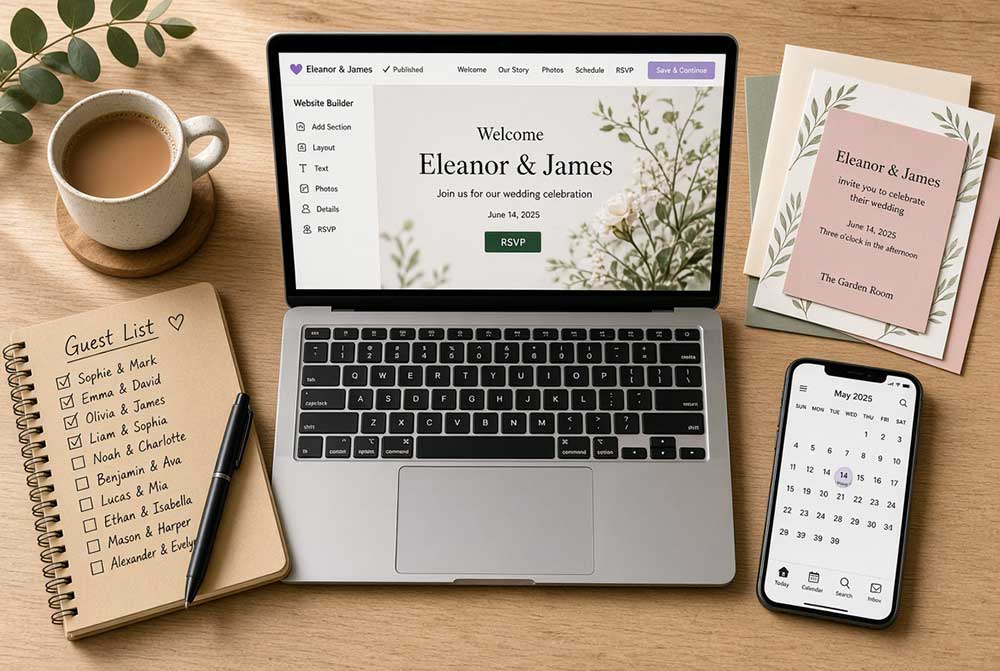
Pick a wedding website builder in week one, not week six. The Knot, Zola, and Joy all do roughly the same job: RSVP collection, a shared itinerary page, registry links, and a URL you send instead of retyping the same details forty times. Zola tends to work better if you’re also registering there since the systems talk to each other. Joy has slightly cleaner design defaults if you’re not comfortable customizing layouts yourself.
The mistake couples make here is treating the website as a design project. It’s not. Spend twenty minutes filling in the essentials — date, venue, RSVP deadline, hotel block — and move on. You can prettify it later, or not at all. Guests scan for three pieces of information and leave: when, where, what to wear. A gorgeous color palette doesn’t change RSVP rates. Clear information does.
One thing that trips people up: website RSVP data doesn’t automatically become your seating chart or your caterer’s headcount. You still have to export it, clean it, and hand it off. Budget an afternoon for this closer to your final headcount deadline, not the week of.
Guest List and RSVP Tracking: Where Most Timelines Actually Break
The direct answer is a shared spreadsheet or your website’s built-in tracker, updated weekly, with one person owning it. Not two people. One.
Here’s the part nobody says out loud: the moment you let RSVPs come in through text, email, a physical mail response card, and your website form simultaneously, you’ve created four sources of truth that will disagree with each other. Someone will RSVP twice. Someone’s plus-one will be recorded differently in two places. Someone will tell your mother in person at a grocery store and nobody will write it down at all.
The fix isn’t a better app. It’s a weekly fifteen-minute reconciliation session where every RSVP, regardless of channel, gets logged in exactly one master document. Couples who skip this step tend to discover the mismatch three days before their catering headcount is due, which is the worst possible time to discover it.
For dietary restrictions and plus-ones, build those fields into your RSVP form from the start. Adding them retroactively means re-contacting everyone who already responded, and response rates on a second ask drop noticeably — people assume they already handled it.
Finding Vendors Online: Search Results Aren’t a Ranking of Quality
Type “wedding photographer near me” and the results you get are shaped by advertising budgets and SEO work, not by who shoots the best weddings in your area. That’s not cynicism, it’s just how search ranking functions. The photographer on page one paid attention to their website’s search optimization. That has no necessary relationship to how they handle a rainy outdoor ceremony.
Directories like The Knot Marketplace, WeddingWire, and Zola’s vendor search are better starting points than open web search because at least the listings are wedding-specific and often include verified reviews. Still treat the top results as a longlist, not a shortlist. Cross-reference any vendor you’re seriously considering against Instagram or a personal portfolio site — professional photo galleries and social posts, especially recent ones, tell you more about actual output than a directory profile written by the vendor themselves.
Read reviews for pattern, not for star rating. A vendor with 4.7 stars and three detailed reviews describing late arrivals is a bigger red flag than a vendor with 4.4 stars and generic five-word praise. Volume and specificity matter more than the average.
One thing worth acknowledging: online reviews for wedding vendors skew heavily toward extremes — furious brides and ecstatic brides post, satisfied-but-unremarkable experiences mostly don’t get written up. Keep that skew in mind when a vendor has thirty reviews and two are scathing. That ratio is close to normal for the industry, not necessarily a warning sign.
Virtual Vendor Meetings: What Actually Transfers Over a Screen
Video calls work fine for narrowing a list — comparing packages, discussing availability, getting a general sense of personality fit. What doesn’t transfer well over video is anything involving physical space, food, or fabric.
Cake tastings, dress fittings, and venue walkthroughs lose almost everything meaningful in a video call. You can’t judge a venue’s acoustics, natural light shift across the day, or how a room actually feels at capacity from a phone camera panning across it. If a venue only offers virtual tours and resists an in-person visit before you sign, that’s worth questioning directly rather than accepting as standard practice.
Where video calls genuinely help: initial vendor interviews (saves half a day of driving for a fifteen-minute conversation that tells you whether to bother meeting in person at all), coordination calls with a planner once contracts are signed, and follow-up questions that don’t need a physical demonstration. Book these back-to-back on a single day when you’re comparing multiple vendors — going in cold, one call at a time spread across three weeks, makes it much harder to compare answers since you’ll have forgotten the details of the first call by the third.
Registries, Digital Gifting, and the Cash Question
Traditional department store registries (Crate & Barrel, Williams Sonoma, Target) still work and integrate with most wedding websites through universal registry add-ons like Zola’s or MyRegistry.com, which pull items from multiple stores into one link. That solves the old problem of guests needing to check five separate registries.
Cash funds are the part people feel awkward about and shouldn’t. Platforms like Zola and Honeyfund let you set up funds for a honeymoon, a house down payment, or general contributions, and framing them specifically (“help us cook our first meal in our new kitchen” rather than a vague “cash fund”) noticeably increases how much guests contribute. Vague asks read as impersonal. Specific ones read as an actual gift with a purpose attached.
One limitation worth naming: registry fulfillment through third-party platforms occasionally has processing delays around high-volume periods (wedding season, holidays), and returns or exchanges sometimes have to go through the platform rather than the original retailer directly. Read the fine print on any registry service before committing your full list to it.
Matching Tools to Your Actual Situation
| Task | Good online tool for | Skip it if |
|---|---|---|
| Wedding website & RSVPs | Most couples, especially 75+ guests | You have under 30 guests and can manage by phone/text easily |
| Vendor discovery | Early-stage research, building a longlist | You already have trusted referrals from someone whose wedding you attended |
| Virtual vendor meetings | Initial interviews, follow-up questions, planner check-ins | Tastings, fittings, venue walkthroughs, final contract discussions |
| Digital registry | Couples wanting one unified list across stores | You strongly prefer guests shop in person or want to avoid processing fees entirely |
| Cash gift platforms | Honeymoon funds, house funds, specific big-ticket goals | Cultural or family expectations lean firmly toward traditional gifts only |
A short checklist, roughly in order:
- Pick and set up a wedding website — easy, about 2 hours
- Build one master guest-tracking document — easy, about 1 hour to set up, 15 minutes weekly after
- Shortlist vendors online, verify through social/portfolio — moderate, 3–5 hours spread over a week
- Schedule virtual vendor interviews in batches — moderate, half a day per batch
- Set up registry with specific cash fund descriptions — easy, 1–2 hours
- Reconcile RSVPs across all channels before final headcount — moderate, plan for 2–3 hours total, done in short weekly sessions
Where This Advice Comes From, and Where It Runs Out
The vendor discovery and RSVP-reconciliation patterns described here reflect common reporting across wedding-industry surveys (The Knot’s annual Real Weddings Study and WeddingWire’s vendor data are the two most cited sources in this space) combined with how these platforms are actually built and documented. Specific percentages around review skew and gift-fund conversion aren’t cited as hard figures here because reliable, recent public data on those exact numbers is thin — treat those observations as directional, not statistical.
This guide doesn’t cover destination wedding logistics, international guest visa questions, or planning timelines compressed under four months, all of which change the calculus significantly. It also assumes reasonably reliable internet access and comfort with basic apps; if either of those isn’t true for your situation, a phone-and-paper system might genuinely serve you better than forcing a digital one.
The Actual Point
Online tools remove friction from wedding planning. They do not remove decisions. Every platform mentioned here still requires you to decide what matters to you as a couple, and no amount of software closes that gap. The couples who report feeling calm three weeks out aren’t the ones with the fanciest website — they’re the ones who picked their systems early, stuck to one source of truth per task, and stopped tab-hopping in search of a tool that would decide things for them.
Wedding tech keeps shifting — AI-assisted seating chart tools and automated vendor-matching services are showing up on more platforms this year, and some of them are genuinely useful for narrowing hundreds of vendor options fast. Worth trying, not worth trusting blindly. Verify anything they surface the same way you’d verify a stranger’s recommendation, because that’s essentially what it is.